 UpUpUppppppp
- 客户端
1.Unity里编写客户端的代码 2.在Unity3d中创建脚本"SocketClient"
using System;
using System.Collections;
using System.Collections.Generic;
using System.Net;
using System.Net.Sockets;
using System.Text;
using System.Threading;
using UnityEngine;

public delegate void DelegateMsg(string Msg);
public class SocketClient
{

    //客户端socket
    private Socket clientSocket;

    //服务器IP和端口
    public string ServerIP;
    public int ServerPort;
    public DelegateMsg delegateMsg;
    //收消息的线程
    private Thread acceptMsgThread;
    private int MAX_SEND_FILE_LENGTH = 4096;

    //构造函数
    public SocketClient(string _serverIP, int _serverPort)
    {
        ServerIP = _serverIP;
        ServerPort = _serverPort;
    }

    /// <summary>
    /// 连接服务器
    /// </summary>
    /// <returns></returns>
    public bool ConnectServer()
    {
        if (ServerIP == null || ServerPort == 0)
        {
            return false;
        }
        try
        {
            //初始化socket对象
            clientSocket = new Socket(AddressFamily.InterNetwork, SocketType.Stream, ProtocolType.Tcp);
            //初始化地址和端口号
            IPAddress serverIp = IPAddress.Parse(ServerIP);
            IPEndPoint endPoint = new IPEndPoint(serverIp, ServerPort);
            //连接服务器
            clientSocket.Connect(endPoint);


            //新建线程,接受服务端下发的消息
            acceptMsgThread = new Thread(AcceptMsgs);
            acceptMsgThread.IsBackground = true;
            acceptMsgThread.Start();


            return true;
        }
        catch (Exception e)
        {
            return false;
        }
    }
    /// <summary>
    /// 收数据。
    /// </summary>
    private void AcceptMsgs()
    {
        try
        {
            while (true)
            {
                byte[] buffer = new byte[MAX_SEND_FILE_LENGTH];
                int dataLength = clientSocket.Receive(buffer);
                if (dataLength == 0)
                {
                    //长度为0表示没接受到内容。断开。
                    break;
                }

                string strMsg = Encoding.UTF8.GetString(buffer, 0, dataLength);
                Debug.Log("客户端接受到消息:" + strMsg);
                Loom.QueueOnMainThread((param) =>
                {
                    delegateMsg(strMsg);
                }, null);
            }
        }
        catch (Exception e)
        {

        }
    }
    /// <summary>
    /// 发送文本消息
    /// </summary>
    /// <param name="msg"></param>
    public bool SubmitMsgToServer(string msg)
    {
        if (clientSocket == null || !clientSocket.Connected)
        {
            return false;
        }
        try
        {
            byte[] buffer = Encoding.UTF8.GetBytes(msg);
            //发送给服务端
            clientSocket.Send(buffer);
            return true;
        }
        catch (Exception e)
        {
            Debug.Log("客户端发送数据发生异常:" + e.ToString());
            return false;
        }
    }

    public bool ClientClose()
    {
        if (clientSocket == null || !clientSocket.Connected)
        {
            return false;
        }
        try
        {
            clientSocket.Close();
            return true;
        }
        catch (Exception e)
        {
            Debug.Log("关闭客户端发生异常:" + e.ToString());
            return false;
        }
    }
}
3.创建脚本"Loom.cs" 实现将线程中的获取到的服务器消息传递到主线程中 "Loom.cs"脚本挂在再Unity场景中
using UnityEngine;
using System.Collections.Generic;
using System;
using System.Threading;
using System.Linq;

public class Loom : MonoBehaviour
{
    //是否已经初始化
    static bool isInitialized;

    private static Loom _ins;
    public static Loom ins { get { Initialize(); return _ins; } }

    void Awake()
    {
        _ins = this;
        isInitialized = true;
    }

    //初始化
    public static void Initialize()
    {
        if (!isInitialized)
        {
            if (!Application.isPlaying)
                return;

            isInitialized = true;
            var obj = new GameObject("Loom");
            _ins = obj.AddComponent<Loom>();

            DontDestroyOnLoad(obj);
        }
    }

    //单个执行单元(无延迟)
    struct NoDelayedQueueItem
    {
        public Action<object> action;
        public object param;
    }
    //全部执行列表(无延迟)
    List<NoDelayedQueueItem> listNoDelayActions = new List<NoDelayedQueueItem>();


    //单个执行单元(有延迟)
    struct DelayedQueueItem
    {
        public Action<object> action;
        public object param;
        public float time;
    }
    //全部执行列表(有延迟)
    List<DelayedQueueItem> listDelayedActions = new List<DelayedQueueItem>();


    //加入到主线程执行队列(无延迟)
    public static void QueueOnMainThread(Action<object> taction, object param)
    {
        QueueOnMainThread(taction, param, 0f);
    }

    //加入到主线程执行队列(有延迟)
    public static void QueueOnMainThread(Action<object> action, object param, float time)
    {
        if (time != 0)
        {
            lock (ins.listDelayedActions)
            {
                ins.listDelayedActions.Add(new DelayedQueueItem { time = Time.time + time, action = action, param = param });
            }
        }
        else
        {
            lock (ins.listNoDelayActions)
            {
                ins.listNoDelayActions.Add(new NoDelayedQueueItem { action = action, param = param });
            }
        }
    }


    //当前执行的无延时函数链
    List<NoDelayedQueueItem> currentActions = new List<NoDelayedQueueItem>();
    //当前执行的有延时函数链
    List<DelayedQueueItem> currentDelayed = new List<DelayedQueueItem>();

    void Update()
    {
        if (listNoDelayActions.Count > 0)
        {
            lock (listNoDelayActions)
            {
                currentActions.Clear();
                currentActions.AddRange(listNoDelayActions);
                listNoDelayActions.Clear();
            }
            for (int i = 0; i < currentActions.Count; i++)
            {
                currentActions[i].action(currentActions[i].param);
            }
        }

        if (listDelayedActions.Count > 0)
        {
            lock (listDelayedActions)
            {
                currentDelayed.Clear();
                currentDelayed.AddRange(listDelayedActions.Where(d => Time.time >= d.time));
                for (int i = 0; i < currentDelayed.Count; i++)
                {
                    listDelayedActions.Remove(currentDelayed[i]);
                }
            }

            for (int i = 0; i < currentDelayed.Count; i++)
            {
                currentDelayed[i].action(currentDelayed[i].param);
            }
        }
    }

    void OnDisable()
    {
        if (_ins == this)
        {
            _ins = null;
        }
    }
}
4.使用方法
 SocketClient client = new SocketClient(ip, port);
 isConnect = client.ConnectServer();
-服务器端
在VisualStudio2022中添加以下脚本"SocketServer.cs"
using System;
using System.Collections.Generic;
using System.Linq;
using System.Net.Sockets;
using System.Net;
using System.Text;
using System.Threading;
using System.Threading.Tasks;

public delegate void DelegateMsg(string Msg);

namespace WindowsFormsAppSocektServer
{
    internal class SocketServer
    {
        //端口号
        private int SocketServerPort = 10001;
        //处理连接请求的线程
        private Thread acceptConnectReqThd;
        private Socket _clientSocket;
        private int MAX_SEND_FILE_LENGTH = 4096;
        public DelegateMsg delegateMsg;
        /// <summary>
        /// 启动服务器
        /// </summary>
        public bool Start(string _ip,int _port)
        {
            try
            {
                //创建一个socket对象
                Socket socketWatch = new Socket(AddressFamily.InterNetwork, SocketType.Stream, ProtocolType.Tcp);
                //获取IP
                IPAddress ip = IPAddress.Parse(_ip);//IPAddress.Any;
                //创建端口号
                IPEndPoint port = new IPEndPoint(ip, _port/*SocketServerPort*/);
                //监听
                socketWatch.Bind(port);
                Console.WriteLine("监听成功");
                socketWatch.Listen(20);  //设定最大的挂起长度

                //新建线程来处理连接请求
                acceptConnectReqThd = new Thread(AcceptConnectReqHandler);
                acceptConnectReqThd.IsBackground = true;
                acceptConnectReqThd.Start(socketWatch);  //把socket对象当做参数传递给到线程里面的方法

                return true;
            }
            catch (Exception e)
            {
                return false;
            }
        }
        /// <summary>
        /// 连接请求的处理函数
        /// </summary>
        /// <param name="_socket"></param>
        private void AcceptConnectReqHandler(object _socket)
        {
            try
            {
                //服务端的socket对象
                Socket serverSocket = (Socket)_socket;

                while (true)
                {
                    //获取客户端socket。Accept方法处理任何传入的连接请求,并返回可用于与远程主机通信数据的Socket对象,即客户端的socket。
                    //这一句话会卡主线程。只要没有新的链接进来,就会一直卡主不动(等待中)。
                    //收到连接事件后,会往下执行,通过while又回到这里继续等待
                    Socket clientSocket = serverSocket.Accept();

                    //创建接受客户端消息的线程
                    Thread acceptMsgReqThd = new Thread(ReciveMsgReqHandler);
                    acceptMsgReqThd.IsBackground = true;
                    acceptMsgReqThd.Start(clientSocket);
                }
            }
            catch (Exception e)
            {
                Console.WriteLine("服务端处理连接事件异常:" + e.ToString());
            }
        }
        /// <summary>
        /// 接收客户端socket消息
        /// </summary>
        /// <param name="_socket"></param>
        private void ReciveMsgReqHandler(object _socket)
        {
            Socket clientSocket = (Socket)_socket;
            _clientSocket = clientSocket;
            try
            {
                while (true)
                {
                    //客户端连接成功后,接受来自客户端的消息
                    if (clientSocket == null)
                    {
                        continue;
                    }
                    byte[] buffer = new byte[MAX_SEND_FILE_LENGTH];  //数据缓冲区。
                                                     //实际接收到的有效字节数
                                                     //Receive也是个卡线程的方法
                    Console.WriteLine("等待接受客户端的数据:");
                    int dataLength = clientSocket.Receive(buffer);
                    Console.WriteLine("接受到客户端的数据,字节数:" + dataLength);
                    //如果客户端关闭,发送的数据就为空,就跳出循环
                    if (dataLength == 0)
                    {
                        break;
                    }

                    //假设收到的是个字符串(先这么假定),转成字符串处理
                    //string strMsg = Encoding.UTF8.GetString(buffer, 1, dataLength - 1);
                    string strMsg = Encoding.UTF8.GetString(buffer,0, dataLength);
                    Console.WriteLine("接受到客户端的消息:" + strMsg);
                    delegateMsg(strMsg);

                }
                //中止当前线程
                //Thread.CurrentThread.Abort();
            }
            catch (Exception e)
            {
                SocketException socketExp = e as SocketException;
                if (socketExp != null && socketExp.NativeErrorCode == 10054)
                {
                    Console.WriteLine("socket客户端关闭:" + e.ToString());
                }
                else
                {
                    Console.WriteLine("======接受消息异常:" + e.ToString());
                }
                //中止当前线程
                //Thread.CurrentThread.Abort();
            }
        }

        public void SendToClient(string sendMsg)
        {
            if (_clientSocket != null)
            {
                byte[] buffer = Encoding.UTF8.GetBytes(sendMsg);
                //发送给客户端
                _clientSocket.Send(buffer);
            }
        }
    }
}
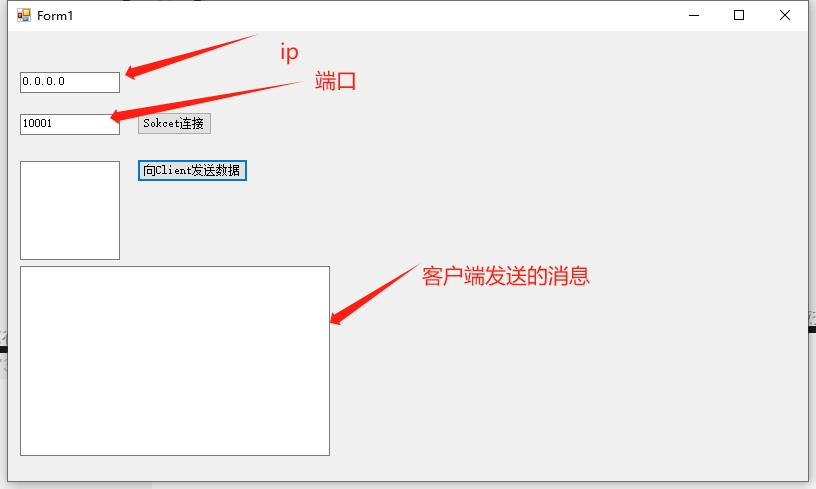
- 使用方法
socketServer = new SocketServer();
socketServer.Start(IP,Port);
下载地址: 链接:https://pan.baidu.com/s/167XeUUsulXHHtIdeIfhgeA?pwd=btvd 提取码:btvd